
Website portability has seven layers. Export moves only some.
Export moves files, not sites. A layer-by-layer test for website portability: what artifact leaves, what stays behind, and the handoff manifest to request before you sign up.
Most founders read "exports your code" as "I can leave whenever I want." Website portability is the question underneath.
Webflow's own help page reads differently, and Webflow is the one being honest here. The export is real. You get a ZIP with your CSS, a JavaScript folder, your images, and an .html file for every page. Then the page tells you what is not in there: CMS content and functionality, user accounts, ecommerce, code components, localized pages. Password-protected pages stop being protected after export. Site search and forms, including file upload and reCAPTCHA, will not work on the exported site at all.[1]
One product. One export. Website portability comes out different depending on which part of the site you were actually asking about.
That gap is the subject of this post. Export names a file transfer, and you were asking about a move. What follows is how to tell the two apart before you commit: seven layers, the artifact each one produces on exit, and the one request that gets a vendor to answer in writing.
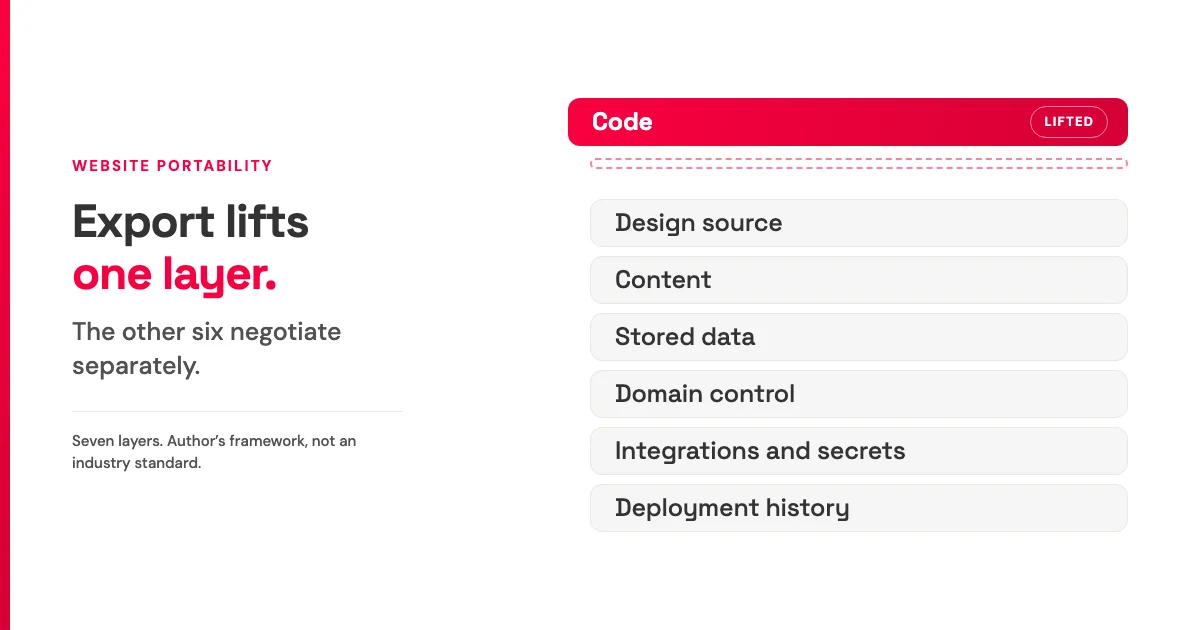
TL;DR: Export is a file transfer, not a move. Website portability is not one property but seven separable layers (code, design source, content, stored data, domain control, integrations and secrets, deployment history), and each leaves on its own terms. The seven-layer split is my framework, not an industry standard. Before you sign up, ask the platform for a per-layer handoff manifest: what artifact you receive, in what format, what is excluded, and what you rebuild by hand.
One word, four different jobs
The word "export" is doing four jobs at once, and buyers hear all four as one.
These four are reader interpretations, not a menu of things vendors ship. Three of them have a documented artifact behind them.
The first is backup. Webflow frames code export as a way to back up your code, hand it to a client, or host it somewhere else.[1] A file-delivery promise, stated plainly.
The second is design handoff. Readdy's Product Hunt listing pairs one-click publish with the option to "export as clean code and Figma files."[2] That is a listing claim about a separate design-file deliverable, not evidence of a running site or of design-source round-tripping.
The third is content migration. Squarespace produces a WordPress-format file. It carries layout pages, one blog page with its posts, text blocks, image blocks, and gallery pages. It does not carry store pages, portfolio pages, index or calendar pages, drafts, style settings, or custom CSS.[3] Content moved. The site did not.
The fourth is escape, and that is the meaning the buyer brings to the pricing page. Nothing in this source set ships a deliverable under that name. The nearest documented evidence points the other way: Wix states that a Wix site cannot be exported to another host, because the platform's SaaS architecture relies on Wix's own services to run.[4] That is a boundary on exporting rather than a kind of export, and it reads as architecture, not bad faith.
So nobody is lying. Three documented artifacts, one buyer assumption, one word carrying all of it. If a single word covers four deliverables, you need a smaller unit to ask about.
The seven layers of website portability, and why they leave separately
Here is the smaller unit. Website portability splits into seven layers: code, design source, content, stored data, domain control, integrations and secrets, and deployment history. Each one produces its own artifact when you leave, or produces nothing.
This is my framework and an inference from the source set, not an industry standard with a formal name. It is useful because it turns a yes/no question into seven answerable ones.
Webflow is the cleanest worked example because it documents itself. The ZIP holds a CSS folder (your site CSS plus webflow.css and normalize.css), a JS folder, an images folder, and .html files for every page, including empty Collection template pages.[1]
Read that against the layers, alongside the exclusion list from the top of this post, and the split is obvious. Code leaves. Content does not, because CMS entries are not in the ZIP. Stored data does not, because user accounts and ecommerce databases are not in the ZIP. The forms that generate stored data stop working. Four outcomes, one button.
One more specific from the same page, and it is the one buyers miss: code export is available on Workspace plans, not Site plans.[1] Portability can be a pricing tier rather than a property of the product.
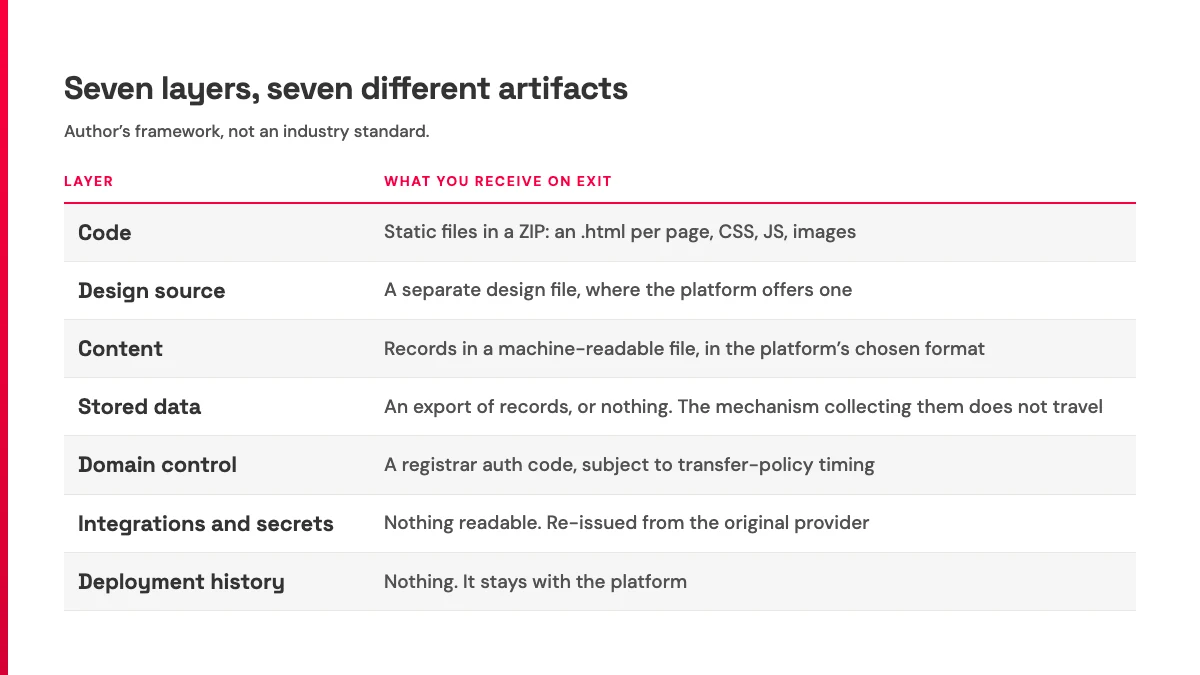
Three of the seven barely appear in export discourse. On my reading of these sources, they are the three most likely to leave a buyer stuck.
The three layers most likely to strand you
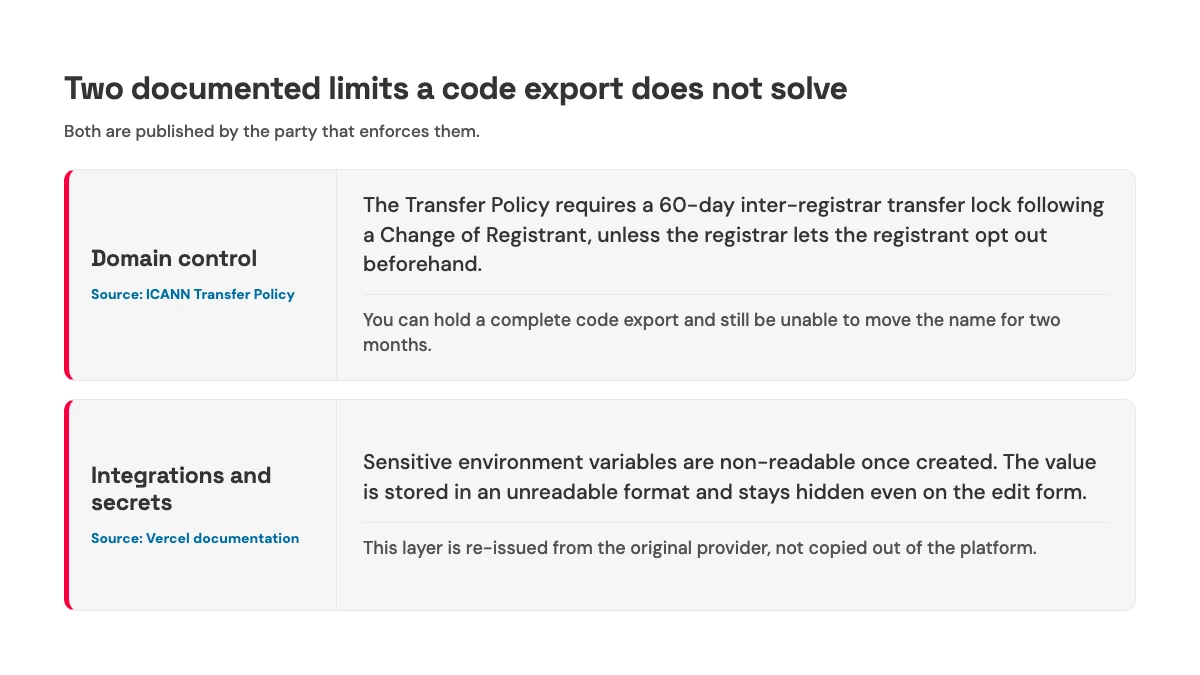
Which three carry the most risk is my judgment, drawn from the sources below rather than stated by any of them. The evidence inside each one is documented, and I have kept the two apart so you can tell which is which.
Domain control. ICANN's Transfer Policy requires a registrar to impose a 60-day inter-registrar transfer lock following a Change of Registrant, unless the registrar lets the registrant opt out beforehand. Registrars must also advise the prior registrant to move the name to another registrar before changing registrant, precisely to avoid triggering the lock.[5] Get that sequence backwards and you can hold a complete, perfect code export while being unable to move your own name for two months.
Integrations and secrets. Vercel documents sensitive environment variables as non-readable once created: the value is stored in an unreadable format, and even the edit form hides it.[6] That is good security, and it is why the migration checklist needs an item that is easy to miss. Plan to re-issue any API key whose original value you cannot retrieve, then audit the integrations that depend on it.
Stored data. Form submissions and user records can contain personal data, and personal data is a different object from the files in a ZIP. Where it applies, and under the conditions set out in the article itself, GDPR Article 20 gives a data subject the right to receive personal data concerning them "in a structured, commonly used and machine-readable format" and to transmit it to another controller.[7] That right concerns the personal data. It does not move your site build or the runtime it runs on. Next to it sits the plain vendor fact from earlier: Webflow states that forms, file upload and reCAPTCHA included, will not work on exported sites.[1] The submissions you already collected and the mechanism collecting new ones are two separate problems.
Content and stored data are two layers here rather than one for an architectural reason. A real, working website with a built-in database rather than CMS entries makes the distinction visible, and once a site holds records instead of pages, "export my content" stops being a single question.
None of this is a vendor failing. It is structural, which is exactly why a promise is the wrong thing to accept and an artifact is the right thing to ask for.
Two laws already split the problem in two
If the split were an editorial invention, regulators would not have arrived at it first, from a different direction and years apart.
GDPR Article 20 gives a data subject the right, under the conditions set out in that article, to receive personal data concerning them in a structured, commonly used and machine-readable format, and to transmit it to another controller, including direct controller-to-controller transmission where technically feasible.[7] The EU Data Act came into force on 11 January 2024 and became applicable on 12 September 2025. It sets out a framework for customers to switch between providers of data-processing services.[8]
Two instruments exist for what buyers keep treating as one button. One addresses personal data. The other addresses switching between services. Two objects, two instruments, and the same split the seven-layer model is built on.
I am describing what each instrument addresses, not what you are entitled to. Whether either applies to your site, your records, or your vendor is not something this post can tell you.
What the law had to do first was name the object before it could be moved. So does the buyer.
Ask for the handoff manifest
The request is four columns and seven rows. For each layer: what artifact do I receive, in what format, what is explicitly excluded, and what do I have to rebuild by hand.
Send it before you sign up, while you are still a prospect and the answer still costs the vendor something to withhold.
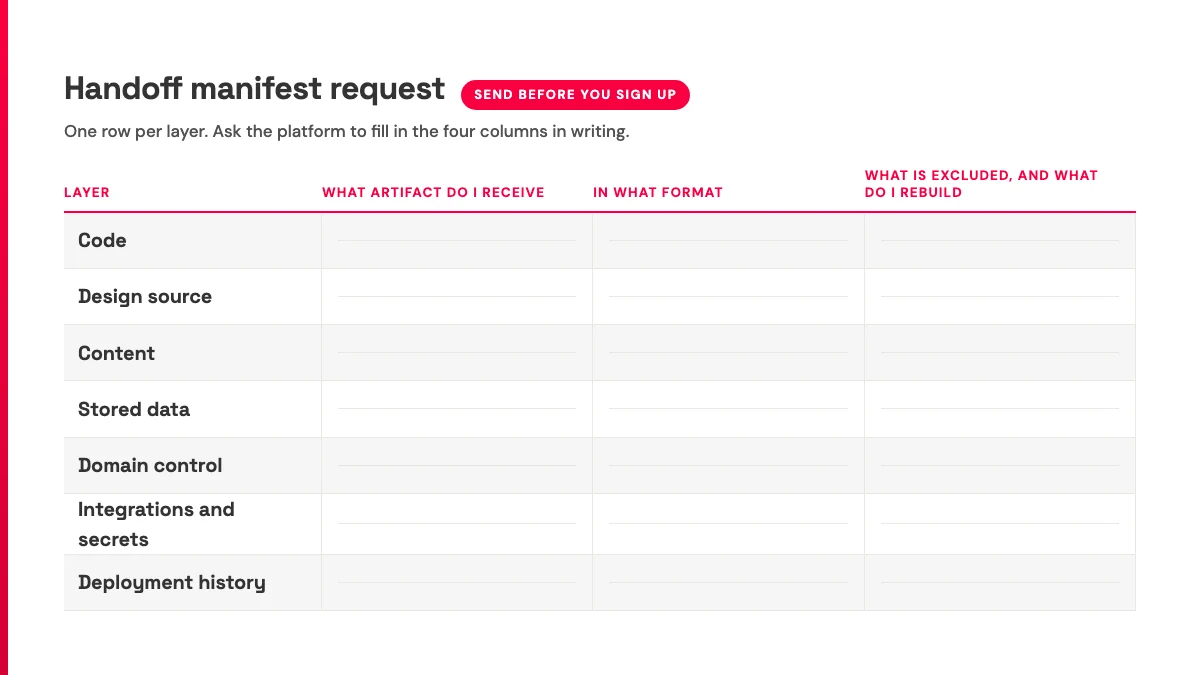
The standard already exists in public. Webflow's help page answers all four columns for the code layer without anyone asking: the artifact (a ZIP), the format (CSS, JS, images, .html per page), the exclusions (that verbatim list), and the rebuild work (forms and site search have to be replaced).[1] A worked example of a good answer, not a grade on Webflow versus anyone else.
Now the part that is my read rather than a source finding: how fast a vendor produces that manifest tells you whether they have thought about the question. A support team that returns with a per-layer answer has been asked before. A vague reply, or a link to a marketing page with the word "export" on it, is also information. No source in this set measures reply speed or ties it to migration outcomes, so take it as a signal I trust, not a finding.
The narrower, source-backed version is this: a visible Product Hunt review of Readdy asks the maker to "provide at least one sample export or integration with Figma... Even a limited or watermarked version would be incredibly valuable."[2] That the request was made is fact. What its answer predicts is inference.
It is the same discipline as judging an AI builder by the second change rather than the first draft, applied one layer down. Save the four columns and paste them into your next vendor conversation.
Which is where a fair objection arrives, because plenty of readers do not need any of this.
The honest case for the bundle
The strongest argument against everything above is that the integration is the product.
SleekCMS's Show HN describes a cloud website platform combining a headless CMS, a static site builder, and integrated infrastructure, so that users need "no git repos, servers, databases or hosting providers," with a bring-your-own-agent option on top.[9] That is the maker's own description, and under that pitch, demanding full runtime portability asks the product to be worse at its actual job. Bundling is a design choice with real benefits. Price it, do not condemn it.
Its practical form is the size threshold, and this one is my judgment with no source behind it. A small event site or a name test may not need a seven-layer worksheet. If the copy lives in someone's notes and the site has no stored records, running a portability review first can be a way of not shipping. The calculus flips at a specific point: when the site starts collecting form submissions, holds user accounts, or carries a domain with mail records attached. No source in this set puts a number, a page count, or a cost on that threshold, and I am not going to invent one.
There is also a genuine openness that gets mistaken for portability. Framer's June 2026 post says many teams already rely on AI tools like Claude Code, Cursor, and Codex, and that Framer Agents can connect with those tools, extending existing AI workflows into website creation and management.[10] That lowers switching cost for the humans, which is worth something. The post does not discuss export, data portability, or ownership terms, and I am not reading anything into it that it does not say. Your agent reaching into the platform is access. Where the site is deployed and where the records live is custody. Different layers, and which tier of tool you bought decides how much of the runtime the bundle holds.
Bundling is legitimate. Refusing to describe what the bundle holds is a different thing.
What to do before you sign up
Reward the vendor who tells you what is excluded. Distrust the bare noun.
That is the answer to the AI-style question behind this post: website portability is not guaranteed by exporting your AI-built website. Exporting your AI-built website does not, on its own, mean you can move it. Export delivers files for some layers. Stored data, domain control, integrations and secrets, and deployment history each move on separate terms, or do not move at all, so the useful pre-purchase step is to request a per-layer handoff manifest rather than accept "export" as a feature.
For our own answer, since it would be strange to run this test on everyone else and skip it: Boomlink's publishing documentation describes exporting a site as static HTML from the dashboard or through MCP, custom domains via a CNAME plus a verification TXT record with apex support through edge routing, and version snapshots with rollback.[11] The stored-data layer is the one worth reading about separately, because every Boomlink site keeps its own embedded database with a public data endpoint rather than holding your records in a shared platform table: what is Boomlink covers that model. That is a description of documented surface, not a claim that it covers all seven layers. Hold it to the same four columns as everyone else's.
Send the seven-layer manifest request to the platform you are evaluating, before you sign up.
References
- Webflow Help Center, "How do I export my Webflow site code?" (captured 2026-08-02). Webflow states the exported ZIP contains CSS, JS, images, and .html files for each page including empty Collection template pages, and that CMS, User Accounts, Ecommerce content (databases), code components and functionality, and localized pages, elements, and content are not included. Password protected pages are no longer protected after export, and site search and forms (including file upload and reCAPTCHA) will not work on exported sites. Code export is available on Workspace plans. Vendor documentation. https://help.webflow.com/hc/en-us/articles/33961386739347-How-do-I-export-my-Webflow-site-code
- Product Hunt, Readdy product page and reviews (captured 2026-08-02, 4.3/5 across 14 reviews). The listing says users can publish with one click or export as clean code and Figma files. A visible review by Harsh Kumar asks Readdy to provide at least one sample export or Figma integration, "Even a limited or watermarked version would be incredibly valuable." Listing claim and user review; not evidence about export quality. https://www.producthunt.com/products/readdy
- Squarespace Help Center, "Exporting your site" (captured 2026-08-02). Squarespace states the export produces a WordPress-format file carrying layout pages, one blog page with posts, text blocks, image blocks, and gallery pages, and does not carry other page types (album, cover, index, info, calendar, portfolio, store), page-specific headers, footers and sidebars, more than one blog page, dropdowns, audio blocks, product blocks, video blocks, drafts, style settings, or custom CSS. Vendor documentation. https://support.squarespace.com/hc/en-us/articles/206566687-Exporting-your-site
- Wix Help Center, "Exporting or Embedding Your Wix Site Elsewhere" (captured 2026-08-02). Wix states that a Wix site cannot be exported to another host because the SaaS architecture uses Wix proprietary technology and relies on Wix services to operate. Vendor documentation. https://support.wix.com/en/article/exporting-or-embedding-your-wix-site-elsewhere
- ICANN, Transfer Policy (captured 2026-08-02). The policy states that the Registrar must impose a 60-day inter-registrar transfer lock following a Change of Registrant, provided that the Registrar may allow the Registered Name Holder to opt out prior to any Change of Registrant request, and that registrars must advise the prior registrant to request the inter-registrar transfer before the Change of Registrant. Policy text. https://www.icann.org/resources/pages/transfer-policy-2016-06-01-en
- Vercel Docs, "Sensitive environment variables" (last updated 2026-06-03, captured 2026-08-02). Vercel states that sensitive environment variables are non-readable once created, that the variable is stored in an unreadable format, and that the current value is hidden when editing. Vendor documentation. https://vercel.com/docs/environment-variables/sensitive-environment-variables
- GDPR Article 20, Right to data portability (captured 2026-08-02). The article provides that the data subject shall have the right to receive the personal data concerning them, which they have provided to a controller, in a structured, commonly used and machine-readable format, and to transmit those data to another controller, including direct controller-to-controller transmission where technically feasible, subject to the conditions set out in the article. Legal text; cited as description, not as legal advice. https://gdpr-info.eu/art-20-gdpr/
- European Commission, Data Act policy page (captured 2026-08-02). The Commission states that the Data Act entered into force on 11 January 2024 and became applicable on 12 September 2025, and that it establishes new rules setting the framework for customers to effectively switch between different providers of data-processing services. Official EU source; cited as description, not as legal advice. https://digital-strategy.ec.europa.eu/en/policies/data-act
- Hacker News, "Show HN: SleekCMS - Lovable for Websites" (item 48435262, captured 2026-08-02). The maker describes a cloud website development platform with a AI code generators interface combining a headless CMS, a static site builder, and integrated infrastructure, so users need no git repos, servers, databases or hosting providers, with a bring-your-own-agent option. Maker's own description; not independently verified. https://news.ycombinator.com/item?id=48435262
- Framer Blog, "Framer 3" (published 2026-06-16, captured 2026-08-02). Framer states that many teams already rely on AI tools like Claude Code, Cursor, Codex, and similar agent workflows, and that Framer Agents can connect with the tools teams already use, extending existing AI workflows into website creation and management. The post does not discuss export, data portability, or site-ownership terms. Vendor capability claim. https://www.framer.com/blog/framer-3/
- Boomlink Docs, publishing guide (captured 2026-08-02). Boomlink documents subdomain publishing, custom domains via a CNAME plus a verification TXT record with apex support through Cloudflare Workers edge routing, version snapshots with rollback and traffic splitting, and exporting a site as static HTML from the dashboard or via MCP. First-party product documentation; described here, not benchmarked. https://boomlink.ai/docs/guides/publishing