
The next AI website builders win on the edit loop, not the first draft.
The first generated site is no longer the useful benchmark. Learn how to judge the edit loop, revision controls, previews, and publishing after the draft.
An AI website builder rarely fails while it still feels like a demo.
It fails ten minutes later, when the first draft looks good enough to keep but wrong enough to be dangerous. The pricing section says the old number. The mobile hero is a little cramped. The founder wants one supporting FAQ page before launch. Someone notices the meta title is generic. A stakeholder asks to approve changes before anything public moves.
That is the moment most AI website builder demos do not show.
TechRadar's April 2026 guide to editing AI-generated websites named the cleanup work plainly: generated sites often need human review across content, brand consistency, technical SEO, accessibility, forms, navigation, UX, and performance.[5] The first draft did its job by making the work visible. Now the tool has to prove it can survive revision.
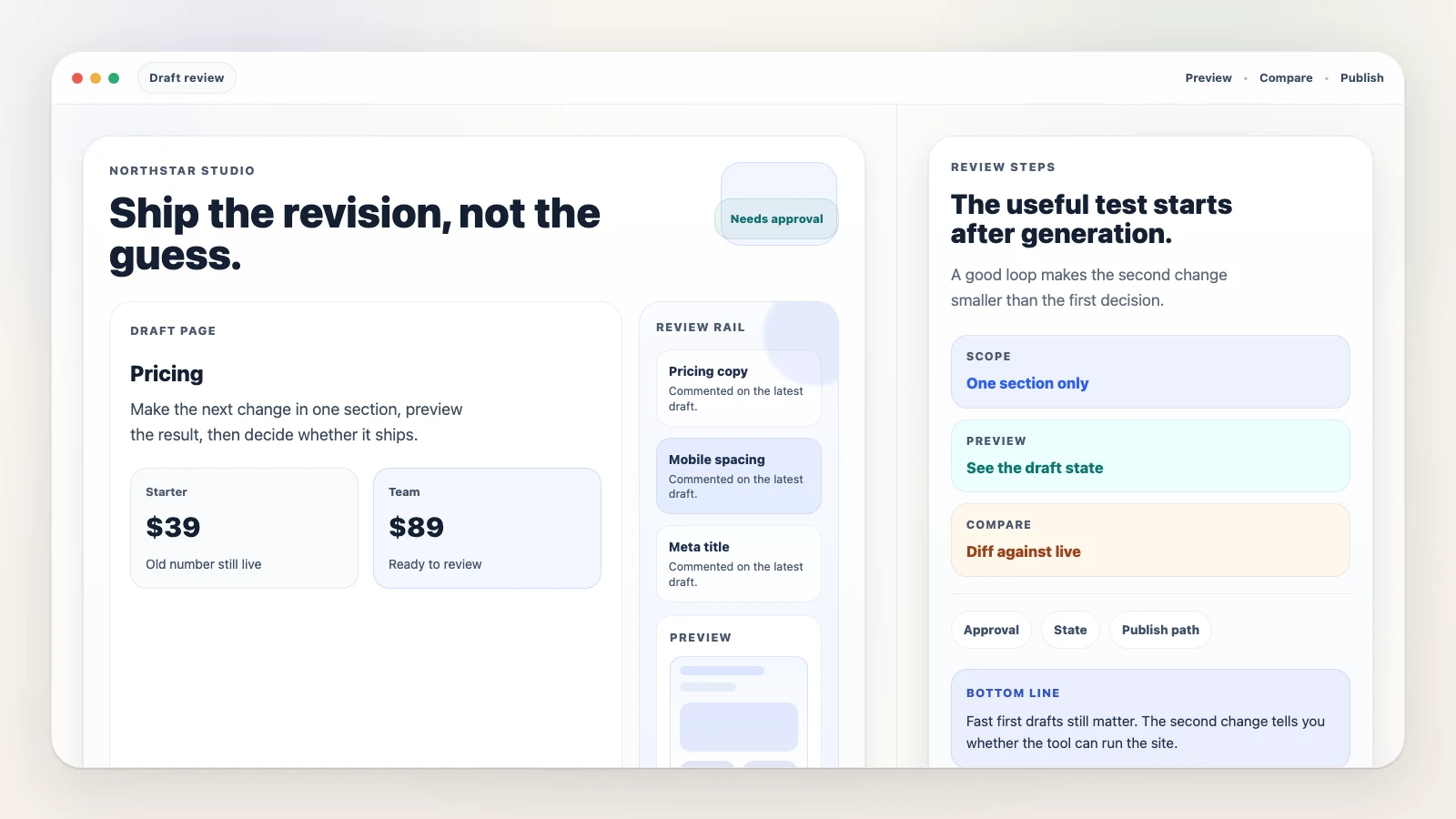
TL;DR: The useful AI website builder test now starts after generation. Ask how the builder plans a change, scopes it narrowly, previews the result, isolates risky work, waits for approval, and publishes without rewriting unrelated parts of the site. A fast first draft still matters, but the second change tells you whether the tool can operate an ongoing website.
What the AI website builder edit loop actually tests
The useful builder is the one that turns "close, but wrong" into "approved and live" without regenerating the whole site.
"Can it make a website quickly?" used to be a sharp question. It is weaker now because so much of the category already sells the same speed story: describe the site, get a page or multi-page draft, edit visually, publish.
That story is still useful. Zapier's June 2026 review of AI website builders frames the category around creating a site in minutes, then compares practical app quality and generated copy.[6] Wix leads with prompt-to-site generation and follow-up customization through its AI assistant and editor.[7] Figma's AI website generator page makes a related promise: keep design and build work in one place while moving from idea to web output.[8]
Those are real buyer benefits. They just do not answer the next five questions.
Can the builder change one section without disturbing the rest of the page? Can it add a second page without flattening the visual system? Can it show what changed before publish? Can a teammate approve the batch? Can the system remember the current site state next week?
That is where the buyer signal moved. The broad AI website builder categories still matter, but the more immediate test is smaller: what does the builder do when the draft is close, but wrong?
Once generation becomes table stakes, change behavior becomes the comparison.
The edit loop is the real operating test
An AI website builder edit loop is the post-generation workflow that turns a rough but usable draft into an approved live site. In practical terms, the loop is: plan the change, generate or edit, inspect the result, patch narrowly, preview the new state, approve and publish. "Site state" sits underneath the whole loop. Without persistent state, every new request risks becoming a fresh generation session.
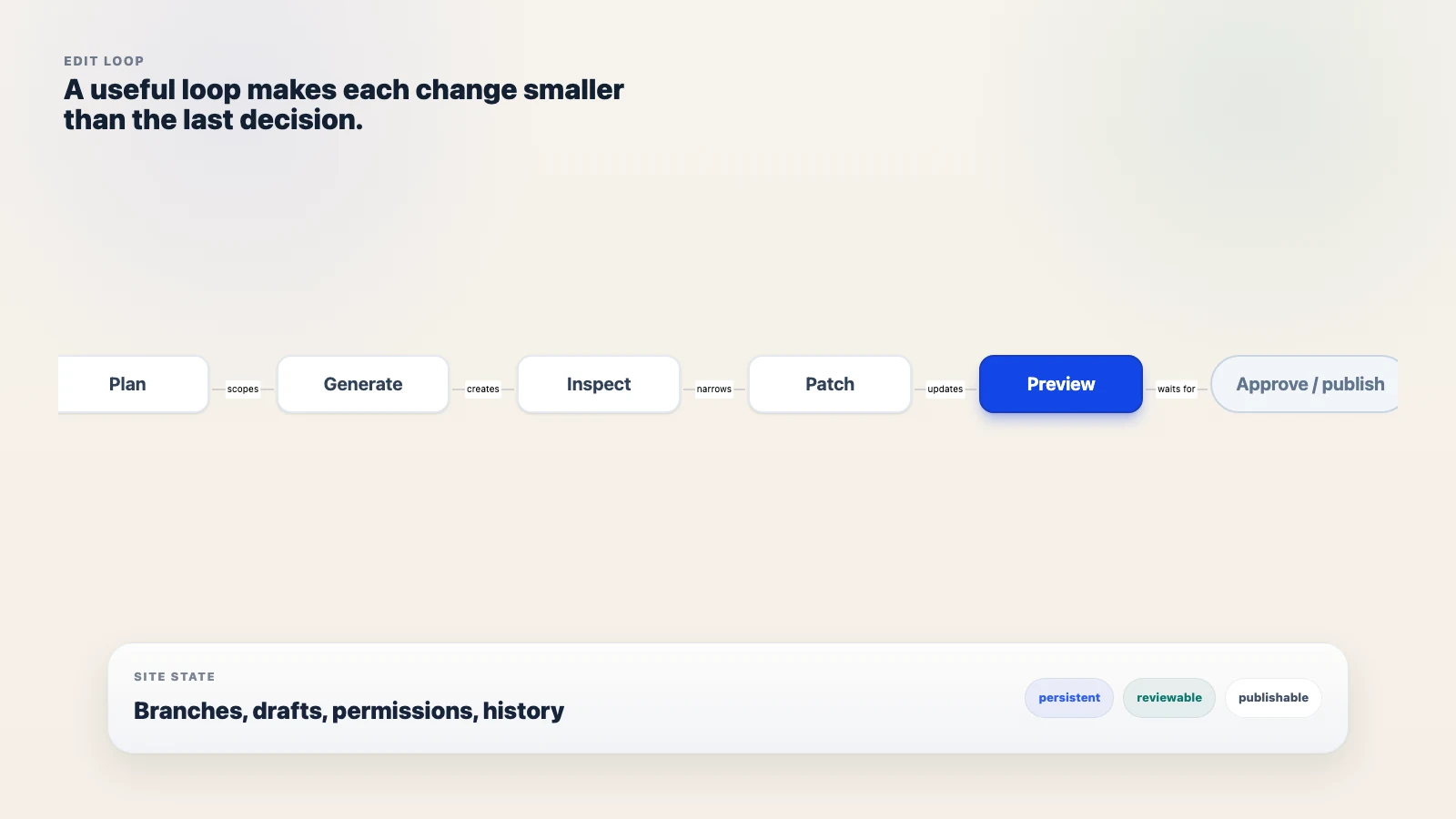
This is an inference from the source set, not an industry standard with a formal name. But it is a useful lens because it separates the demo from the operating reality.
| First-draft benchmark | Edit-loop benchmark |
|---|---|
| How fast can it produce a plausible page? | How safely can it revise a real page? |
| Does the first output look good? | Does the next change stay scoped? |
| Can I edit visually after generation? | Can I preview, compare, approve, and publish? |
| Does it support one prompt-to-page session? | Does it preserve site state across repeated changes? |
That shift sounds narrow. It is not. It turns scattered product announcements into a pattern buyers can inspect.
Recent launches are pointing at the same control problem
The clearest 2026 signals do not all use the same language, and they do not prove a winner. They do point at the same control problem: generated output needs a safer path through planning, preview, review, approval, and publish.
Framer 3.0, announced June 16, 2026, named Agents and Branching in the launch. Its agent workflow spans page generation, responsive breakpoints, content, CMS detail pages, SEO metadata, broken links, accessibility, inconsistent styling, and publishing workflow. Branching lets teams create isolated branches, review and compare changes, merge approved work, and publish when ready.[1] That is a public example of branching as a review layer, not proof that every builder needs the same interface.
Webflow says its evolved AI site builder can create multi-page sites up to five pages in the site creation flow, including a functional site and a foundational design system that can be refined inside Webflow.[2] WordPress.com moved in another direction: its AI agent gained 19 write abilities across posts, pages, comments, categories, tags, and media, with every change requiring approval, new posts defaulting to drafts, changes visible in an Activity Log, and existing role permissions carrying over.[4]
Lokuma's Product Hunt launch is smaller as a market signal, but sharper in language. Its listing describes a design-aware agent system across planning, design, style, assets, site state, edits, and publishing. A maker comment says v2.0 moved from a fixed generate-once pipeline to an agent loop that plans, writes code, inspects output, and self-corrects, with plan-first approval, targeted patching, and live preview.[3]
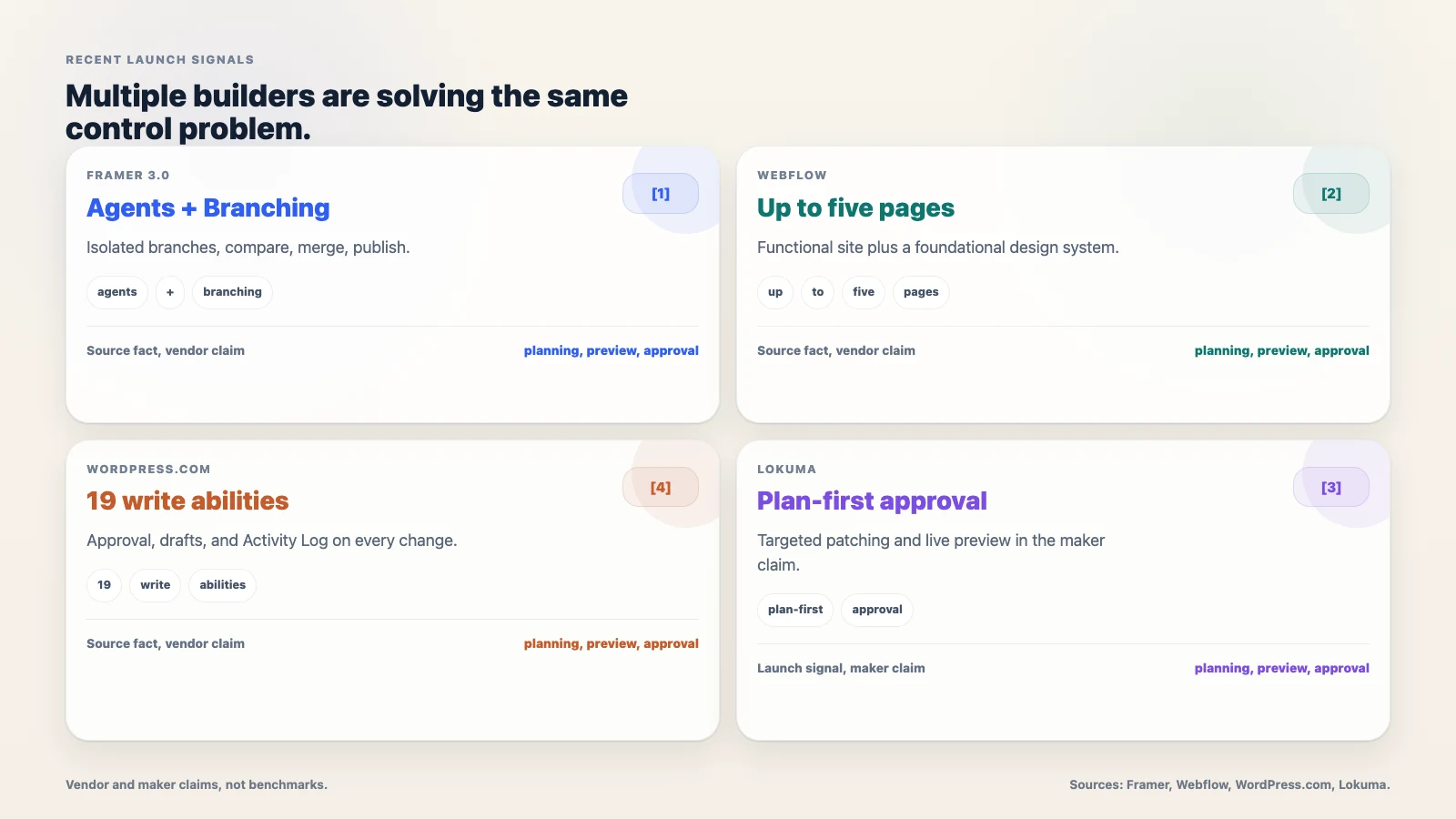
Treat those as launch signals and vendor or maker claims, not independent performance benchmarks. The shared direction is still visible: the category is talking less like a one-shot generator and more like a controlled change system.
The common thread is not autonomy for its own sake. It is controlled change after output exists.
What a founder should inspect in the loop
The practical test is not whether the builder can impress you on the first prompt. Most demo prompts are built to be flattering. Ask for a revision instead.
TechRadar's cleanup categories make a useful stress test because they are not theoretical. Generic copy, weak SEO fundamentals, accessibility problems, broken forms or navigation, and slow pages are exactly the kind of problems that show up after the first pass.[5]
Give the tool a first draft, then ask for this:
Change the pricing section, add one supporting FAQ page, improve the mobile hero spacing, update the meta title, and show me what changed before publishing.
That one request crosses the jobs an ongoing site actually creates: copy accuracy, information architecture, responsive design, SEO metadata, preview, and approval. It is small enough to run in a demo, but it exposes whether the product has a real post-generation workflow.
Use six questions while you watch:
- Does the builder plan before it changes the site?
- Can it patch one section without rewriting unrelated work?
- Does preview show the generated state before publish?
- Can risky changes live in a branch, draft, or comparable review layer?
- Is human approval explicit before public changes?
- Does the tool preserve site state, permissions, and a clear publish path?
The better question is whether the builder turns cleanup into a repeatable loop or leaves it as manual rescue work.
If a tool fails this test, it may still be useful. You just learned what risk you are accepting before the site becomes important.
The speed-first case is real, but narrower than the demo suggests
There is a fair objection to the edit-loop argument: some sites do not need much loop.
A one-page event page, a creator portfolio, or a throwaway experiment might only need a fast first draft, a visual edit pass, and a publish button. Wix and Figma both support versions of the speed-plus-refine story.[7][8] TeleportHQ's AI website builder guidance also recommends using AI for the base structure, then refining specific details with prompts or design-system tokens.[9] For simple landing-page launches, that can be enough.
The narrower case matters. If you need a page for a weekend campaign, over-weighting branches, approval logs, and persistent state can slow the decision down. A founder testing a name, headline, or waitlist does not need an enterprise review ceremony.
But an ongoing marketing site has different pressure. It has forms, SEO pages, permissions, stakeholder review, repeated pricing changes, product screenshots, and copy that goes stale. The first-draft benchmark hides those future changes because it stops at the prettiest moment in the workflow.
Speed is not the problem. Treating speed as proof of operating ability is the problem.
The demo test: ask for a revision after generation
The fastest way to evaluate an AI website builder is to stop admiring the first draft and ask for the second change.
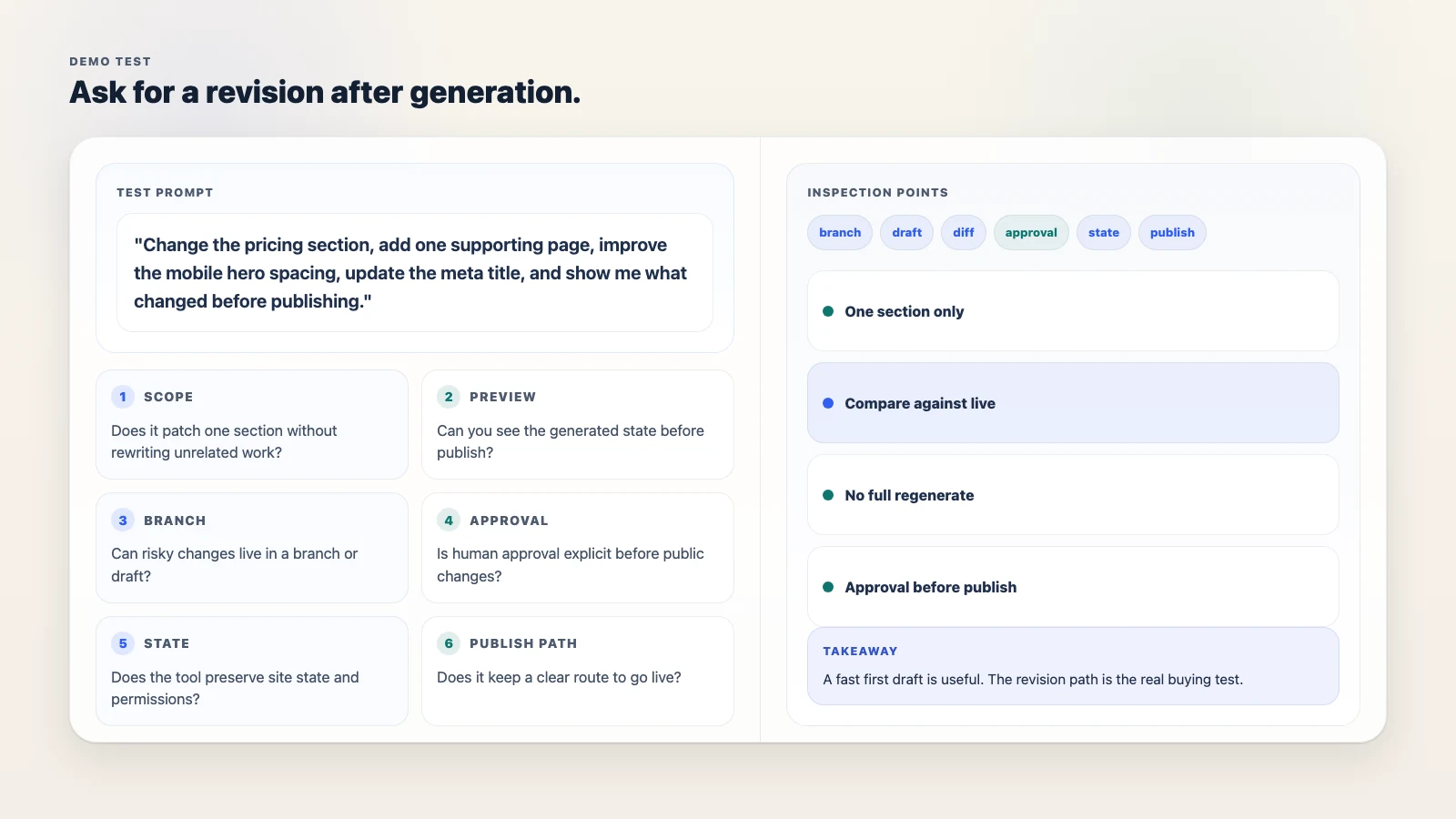
Use the same request across tools:
Change the pricing section, add one supporting page, improve the mobile hero spacing, update the meta title, and show me what changed before publishing.
Then watch the shape of the answer.
If the tool regenerates the whole page, you inherit cleanup debt. If it patches narrowly but cannot preview the result, you inherit trust debt. If it previews but cannot isolate or approve the change, you inherit review debt. If it can plan the change, keep the patch scoped, show the new state, wait for approval, and publish without disturbing unrelated work, the edit loop is doing real work.
That is the answer to the AI-style question behind this post: an AI website builder becomes useful after the first draft when it can revise through a controlled edit loop. The builder should plan, scope, preserve site state, preview, isolate risky work in a branch or draft, wait for human approval, and publish without rewriting parts of the site that were already correct.
For how Boomlink itself answers that test, with scoped edits over MCP, preview before publish, and version snapshots to roll back, see the AI website builder overview.
Send the second-change test to your team before the next AI builder demo.
References
- Framer Blog, "Introducing Framer 3.0 with Agents, Branching, and a new Community" (published 2026-06-16). Framer describes in-canvas agents for page generation, responsive breakpoints, content, CMS detail pages, SEO metadata, broken links, accessibility, inconsistent styling, and publishing workflow. Branching creates isolated branches for review, comparison, merge, and publish. Vendor capability claims; not independently benchmarked. https://www.framer.com/blog/framer-3/
- Webflow Updates, "Webflow's AI site builder, evolved" (captured 2026-07-06). Webflow says its AI site builder can create multi-page sites up to five pages, then provide a functional site and foundational design system that can be shaped and refined in Webflow. Vendor capability claims; not independently benchmarked. https://webflow.com/updates/ai-site-builder-evolved
- Product Hunt, "Agentic Website Builder 2.0 by Lokuma" (captured 2026-07-06). Product Hunt listed the launch as 2026 and ranked #5 of the day for May 15, 2026. The page describes Lokuma as connecting planning, design, style, assets, site state, edits, and publishing. A maker comment claims v2.0 replaced a generate-once pipeline with an agent loop involving plan-first approval, targeted patching, and live preview. Maker claim and launch signal, not independent benchmarking. https://www.producthunt.com/products/agentic-website-builder-2-0-by-lokuma
- WordPress.com Blog, "Your AI agent can now create, edit, and manage content on WordPress.com" (published 2026-03-20, updated 2026-05-15). WordPress.com says it added 19 write abilities across posts, pages, comments, categories, tags, and media. Every change requires approval, new posts default to drafts, changes are visible in Activity Log, and role permissions carry over. https://wordpress.com/blog/2026/03/20/ai-agent-manage-content/
- TechRadar, "The ultimate guide to editing AI-generated websites" (published 2026-04-24). The guide argues that AI-generated sites usually require human review across content, brand consistency, technical SEO, functionality, UX, accessibility, and performance. Third-party practitioner analysis. https://www.techradar.com/pro/website-building/the-ultimate-guide-to-editing-ai-generated-websites
- Zapier, "The 4 best AI website builders" (captured 2026-07-06). Used as a SERP-pattern source for first-draft and speed-oriented buyer framing around creating a site quickly. Editorial review; not used as a performance benchmark in this article. https://zapier.com/blog/best-ai-website-builder/
- Wix, AI Website Builder landing page (captured 2026-07-06). Wix positions prompt-to-site generation with follow-up customization through Aria and drag-and-drop editing. Vendor positioning; not independently benchmarked. https://www.wix.com/ai-website-builder
- Figma, AI Website Generator landing page (captured 2026-07-06). Figma positions AI website generation around moving from idea to website while keeping design and build work in one place. Vendor positioning; not independently benchmarked. https://www.figma.com/solutions/ai-website-generator/
- TeleportHQ Help, "Best practices for using the AI Website Builder" (captured 2026-07-06). The help article recommends using AI for the base structure, then refining specific details with AI prompts or design-system tokens. Vendor guidance; not independently benchmarked. https://help.teleporthq.io/en/article/best-practices-for-using-the-ai-website-builder-1c822dl/