
Framer alternative
Framer Alternative for AI-Chat Website Publishing
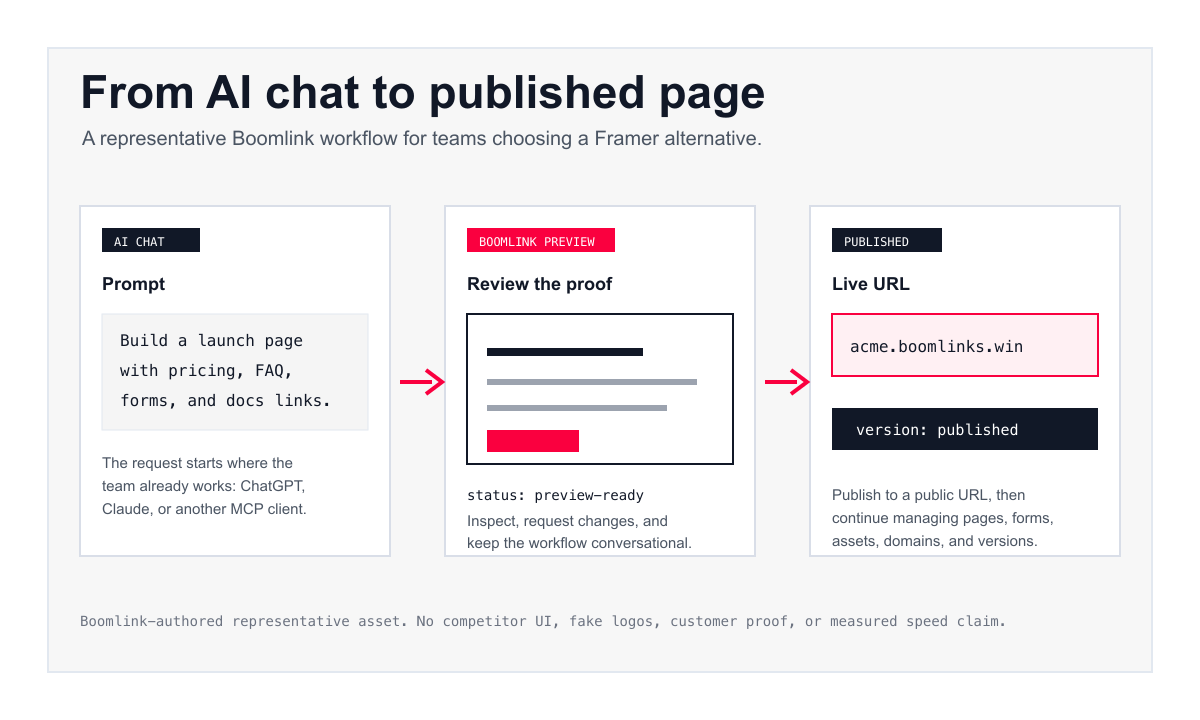
Framer is strong when designers want a front-end-only visual canvas. Boomlink is for teams that want a real, working website with a built-in database: you start from a template in ChatGPT or Claude, ready-made parts do the work, your AI edits the wording and layout, and you preview, collect leads, publish a public URL, and run it all from a single dashboard.
Framer is still the stronger fit when your team wants precise visual control, CMS depth, collaboration, hosting, and AI assistance inside a mature website builder.
No credit card required. Build from ChatGPT, Claude, or any AI assistant.
Browse All Website Builder Comparisons
Published . Last updated .
Quick Answer
Boomlink is a Framer alternative for founders and operators who want a real, working website with a built-in database instead of a front-end-only canvas. You start from a real complete website template, ready-made parts do the work, and your AI edits the wording and layout from ChatGPT, Claude, or another AI assistant. Choose Framer when the desired workflow depends on a polished visual canvas, CMS, design control, collaboration, and Framer's hosting ecosystem.
Choose Boomlink if you want a real, working website with real data, operated by agents over MCP and run from a phone, managed as embedded widgets in one single dashboard.
Methodology: This comparison uses official Framer pages, Boomlink public pages, and Boomlink product-knowledge evidence captured on July 2, 2026.
Prefer a head-to-head breakdown? Read the full Framer vs Boomlink comparison.
Boomlink vs Framer at a Glance
| Evaluation question | Boomlink | Framer |
|---|---|---|
| Primary workflow | Start from a complete website template with a built-in database, then have your AI edit the wording and layout from ChatGPT, Claude, or another AI assistant. | Design and manage a site in Framer's visual canvas, with built-in and external AI agent support. |
| Best fit | Founders and operators who want a real, working website with real data, run by agents and from a phone, without learning a separate design canvas. | Designers and teams who want visual control, CMS, SEO, collaboration, and integrated hosting. |
| AI workflow | Your AI edits only the wording and layout through MCP, while ready-made parts do the heavy functional work. | Offers Framer AI plus external agents including Claude Code, Codex, Cursor, and other tool-capable agents. |
| Site structure | Every site is a real, working website with its own built-in database and way to export your data, plus ready-made parts, multi-page structure, assets, forms, previews, publishing, custom domains, and versions. | Supports pages, CMS, SEO, hosting, staging, collaboration, rollback, and version history. |
| Publishing | Preview the site, then publish to a public URL with documented version and rollback support. Manage it all as embedded widgets in one single dashboard. | Publishes from Framer with hosting infrastructure, atomic deploys, rollback, staging, version history, and uptime messaging. |
| Pricing snapshot | Boomlink public pricing lists Free, Starter at $12/mo, and Team at $29/mo. | Framer pricing was captured on 2026-07-02 with locale-sensitive currency evidence; verify current plan details, currency, add-ons, editor costs, and limits before choosing. |
Bottom line: Choose Boomlink when you need a real, working website with a built-in database, ready-made parts, and agent operation. Choose Framer when the working surface should be a visual design canvas.
When Boomlink Is the Better Fit
Choose Boomlink when you need a real, working website with real data, not a front-end-only canvas: ready-made parts do the work and your AI edits only the wording and layout.
You want a real, working website, not a front-end-only canvas
Framer stops at the frontend. Every Boomlink site is a real, working website with its own built-in database and a way to export your data, so pages, forms, and app-like data live in one place. You start from a real complete website template instead of a blank visual canvas.
You want ready-made parts to do the work
Boomlink sits between AI code generators and WordPress. An isolated (sandboxed) plugin system does the heavy functional work, and your AI edits only the wording and layout from ChatGPT or Claude. The substance is durable plugins and templates, not fragile generated code.
You want it agent-operable, phone-run, and unified
Boomlink is built to be operated by agents over MCP and run from a phone. Every plugin and template renders as an embedded widget in one single dashboard, so you manage the site, its data, forms, analytics, and A/B tests from a single cockpit.
Best Fit, Not Fit, And Clear Tradeoffs
Boomlink is strongest when an AI assistant should drive creation and publishing. Framer is strongest when a visual canvas, CMS, collaboration, and design control are central to the site production workflow.
| Decision point | Boomlink | Framer |
|---|---|---|
| Best for | Real, working websites and marketing sites with real data, built from a template with ready-made parts and edited by your AI. | Designer-led sites where visual control, CMS, animation, collaboration, and hosting depth matter. |
| Not for | Teams that need to reproduce a Framer canvas workflow, complex visual systems, or mature CMS operations. | Teams that want the assistant conversation to remain the primary publishing interface from brief to launch. |
| Where it wins | Shipping a real, working website with a built-in database, powered by ready-made parts, operated by agents and run from a phone. | Precise layout control, designer handoff, CMS-backed sites, and a mature visual website production surface. |
| Main limitation | Boomlink should not be positioned as a full Framer canvas replacement. | Framer can still require teams to work inside the builder when they prefer an AI-chat-led workflow. |
Bottom line: choose Boomlink for an AI-chat publishing workflow. Choose Framer when the visual builder itself is the product team's source of truth.
Fair comparison
When Framer Is the Better Fit
Choose Framer when your team wants a visual design canvas and direct control over layout, styling, interaction, CMS content, SEO settings, collaboration, and hosting. Framer also has AI capabilities, including AI-generated layouts on the canvas and support for external agents such as Claude Code, Codex, Cursor, and others.
Framer is likely the better choice for designers, agencies, and teams that want to shape every page visually inside a mature website builder.
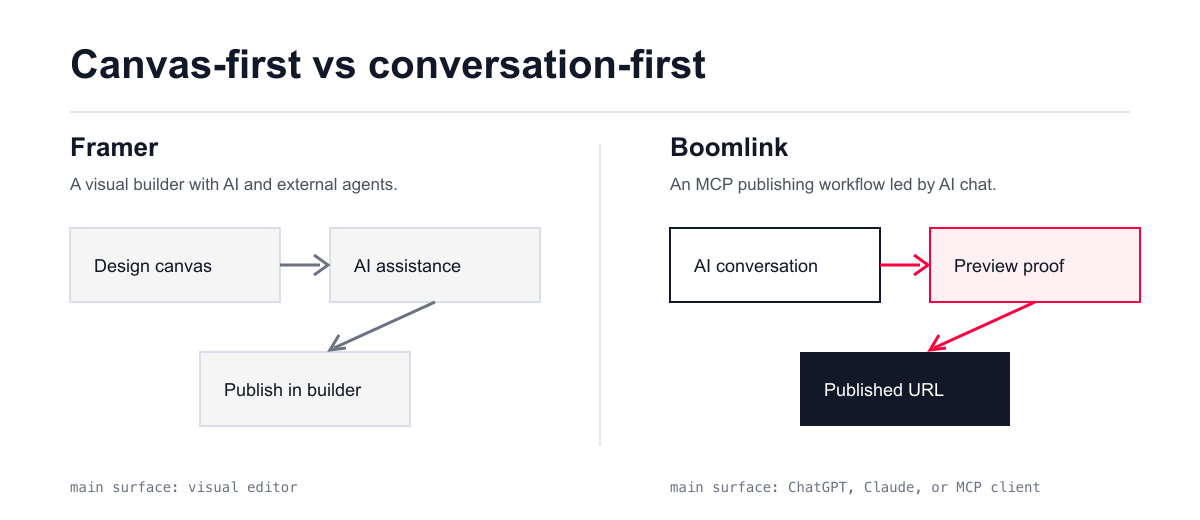
The Real Difference: Front-End Canvas vs Real, Working Website
Framer and Boomlink both fit the AI website builder conversation, but they start from different foundations.
Framer is a front-end-only visual builder that adds AI agents to help create, edit, and manage the design. Boomlink sits between AI code generators and WordPress: every site is a real, working website with a built-in database, ready-made parts do the functional work, and your AI edits only the wording and layout.
So the deliverable is different. With Boomlink you get a real, working website with real data, operated by agents over MCP and run from a phone, and every plugin and template renders as a widget in one single-dashboard dashboard.
Feature and Workflow Comparison
| Capability | Boomlink | Framer | What it means for the buyer |
|---|---|---|---|
| AI assistant access | Your AI edits only the wording and layout over MCP from ChatGPT or Claude, while ready-made parts do the functional work. | Supports Framer AI and external agents that can connect to the canvas, components, CMS, and project context. | Pick Boomlink if you want a real, working website operated by agents. Pick Framer if the visual editor remains the main workspace. |
| Visual design control | Focused on a complete website template and thin-layer edits rather than a pixel-level visual canvas. | Strong designer-led canvas control. | Framer is the safer fit when precision visual control is the buying reason. |
| App architecture and data | Every site is a real, working website with its own built-in database and way to export your data, built from a template with ready-made parts. | A front-end-only visual builder with CMS-backed content, not a real, working website with a built-in database. | Boomlink wins when the deliverable is a real, working website with real data. Framer wins for front-end presentation. |
| Forms and lead capture | Supports form definitions and visitor submissions. | Framer includes form capabilities. | Do not claim superiority without conversion evidence. Present both as capable. |
| Custom domains | Supports custom domain configuration with SSL provisioning in the publishing domain. | Supports custom domains on paid plans, with hosting and infrastructure messaging. | Both support custom domains. Pricing and plan details should be checked at purchase time. |
| Versioning and rollback | Documented version records, version retention, and rollback journey. | Markets atomic deployments, rollback, staging, and version history. | Both address publishing confidence. Framer has stronger public hosting collateral. |
Bottom line: Boomlink is the safer recommendation when the buyer wants a real, working website with a built-in database, ready-made parts, and agent operation. Framer is the safer recommendation when direct canvas control, CMS collateral, and mature hosting collateral are central to the decision.
Pricing Snapshot
Boomlink public pricing lists Free, Starter at $12/mo, and Team at $29/mo. Framer pricing was captured on 2026-07-02 with locale-sensitive currency shown in the evidence. Buyers should verify current plan details, currency, add-ons, editor costs, and limits on Framer's pricing page before choosing.
| Product | Public entry plan | Paid plans shown in research | Pricing note |
|---|---|---|---|
| Boomlink | Free at $0 | Starter at $12/mo, Team at $29/mo | Homepage lists custom domains on paid plans and Free with a Boomlink subdomain. |
| Framer | Free at $0 | Basic and Pro paid plans, plus Enterprise custom | Pricing evidence captured on 2026-07-02 used locale-sensitive currency. Verify current plan details, currency, add-ons, editor costs, and limits on Framer before choosing. |
Bottom line: Compare current limits, currency, add-ons, editor costs, and workflow fit before choosing. Boomlink pricing should be evaluated against the value of staying in the AI assistant workflow.
Which One Should You Choose?
Choose Boomlink if...
- You want a real, working website with a real built-in database and a way to export your data, not a front-end-only page.
- You want ready-made parts and complete website templates to do the work, with your AI editing only the wording and layout from ChatGPT or Claude.
- You want the site operated by agents over MCP and run from a phone, managed as embedded widgets in one single dashboard.
- You want the workflow to cover data, forms, custom domains, versions, and publishing without learning a visual design surface.
Choose Framer if...
- You want a visual design canvas with precise control.
- Designers or agencies will own the site production workflow.
- CMS depth, direct canvas editing, visual polish, collaboration, and Framer's hosting ecosystem are central to the decision.
- You want Framer's built-in AI plus external agent workflows inside the Framer project context.
Switching From Framer To Boomlink
Treat the switch as a workflow decision, not a claim that Boomlink reproduces Framer's canvas. Preserve the published outcomes that matter, then rebuild the site around assistant-led creation, previews, forms, publishing, and ongoing changes.
Keep Framer for pages whose value depends on precise canvas control or CMS depth. Move only the pages where the main advantage is faster AI-chat iteration, lead capture, launch-page publishing, or campaign testing.
- Step 1
Inventory pages, URLs, SEO metadata, forms, assets, CMS-backed content, integrations, and custom domains.
- Step 2
Decide which pages should become AI-chat campaign pages, lead capture flows, or app-like pages with embedded data.
- Step 3
Preview the Boomlink build, verify forms and metadata, then connect domains and publish when the result is ready.
FAQs
Want the outcome of a polished marketing site without learning a designer-first builder?
Start in ChatGPT or Claude on a complete website template with a built-in database. Ready-made parts do the work, your AI edits the wording and layout, and you preview, refine, and publish when it is ready.
No credit card required. Build from ChatGPT, Claude, or any AI assistant.